One Master Image: Getting an AI Image Model to Stay On-Brand Across 24 Backgrounds
We generated a full set of branded video-call backgrounds with an AI image model, and learned that consistency comes from one locked master image and add-only edits, not from better prompts.
We built a library of 24 branded Google Meet backgrounds with an AI image model: the company showroom with cricket being played in it for our dev team in India, baseball for the US office, a CrossFit class, a spin class, sleeping cats, one slightly overweight black labrador. Every image shares the same room, the same pixel-perfect logo, and the same brightness, and any future session can add a new one that matches. The interesting part is not the cats. It is what it took to make image number 24 consistent with image number 1.
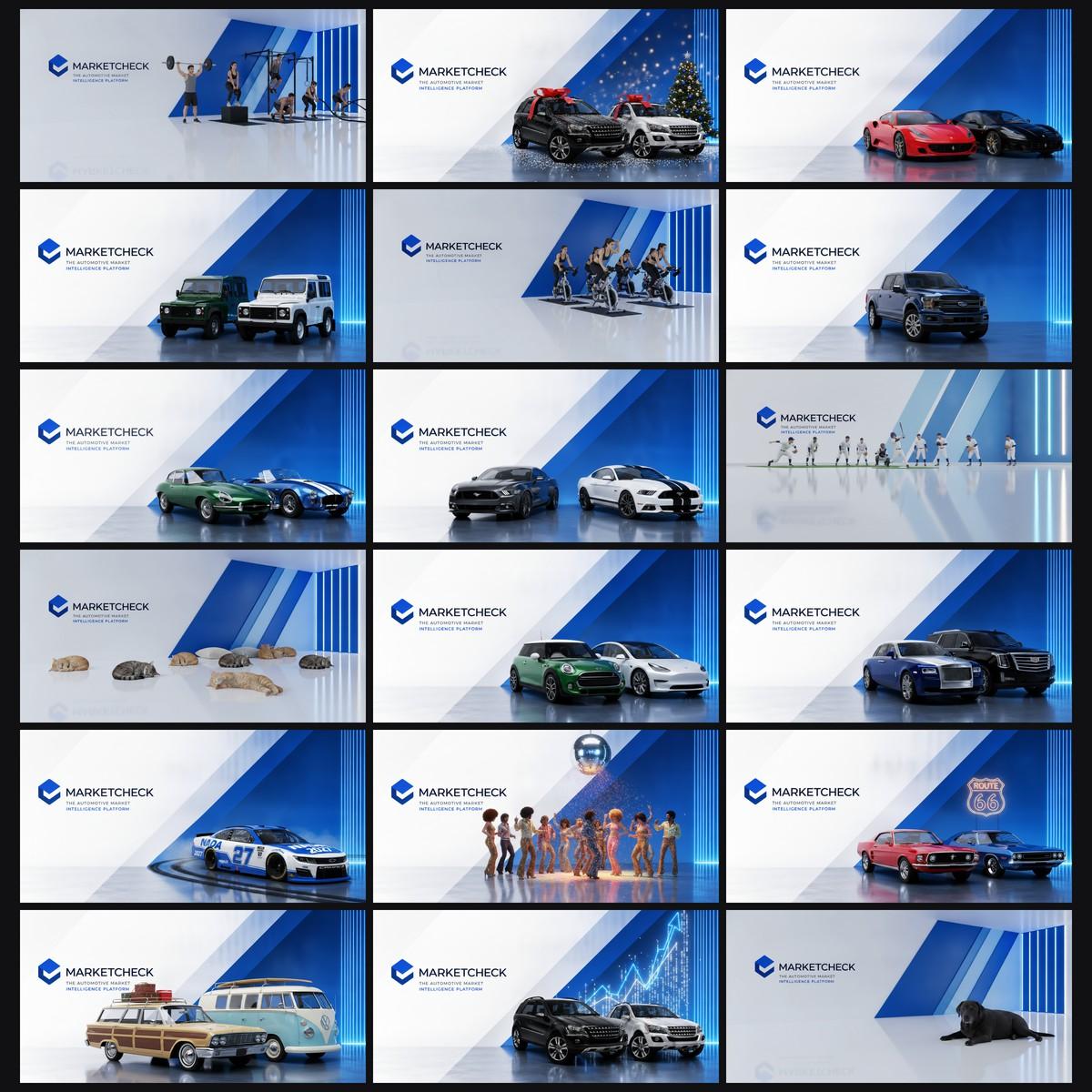
Why bother
Branded video-call backgrounds have a tension in them. Lock everyone to one corporate image and it is consistent but lifeless. Let people generate their own and the brand drifts: every fresh generation invents a slightly different room, a slightly different logo, a slightly different exposure. Our first few scene backgrounds each looked fine alone and mismatched side by side. One was measurably darker than the rest, and the person who requested it spotted it immediately.
The fix was not better prompting. It was changing what the model is asked to do.
The one rule that made it work: add, never remove
After a lot of failed attempts, one asymmetry explains nearly everything we saw. Image edit models are excellent at adding content to an existing image and close to useless at removing content from it.
We asked for dancers to be removed from a scene: they survived. We asked again more firmly: they came back with cat tails. A set of cricket stumps survived five separate removal prompts, including one where we asked for the player and stumps to be replaced together. Meanwhile every single add request, 24 out of 24, worked first time: cars, athletes, Christmas trees, neon signs, a burnout with skid marks.
So the architecture follows the asymmetry. We generated one empty master scene, got it right once, and locked the file. Every new background is an edit of that exact file with an add-only prompt: "Edit this image by ADDING a spin class... change NOTHING else: the logo block, the walls, the floor and the 16:9 framing all stay exactly as they are." The room comes through untouched because the model never redraws it. It only paints new content into it.
Two related traps worth knowing. First, passing a second reference image ("take only the cars from image two") leaks the second image's background into the result, so describe content in text instead. Second, the model will happily preserve a logo through an edit but cannot draw one from a text description: we got mixed-case wordmarks, mangled straplines, and one retry that changed the aspect ratio to 4:1. The master's logo was composited deterministically with ffmpeg, cropped from a known-good render and blended with multiply so its white background vanishes into the wall:
ffmpeg -i room.png -i logo.png -filter_complex \
  "[1]pad=1920:1080:X:Y:white[l];[0][l]blend=all_mode=multiply" out.png
Multiply blending is tone-proof: white pixels leave the wall unchanged, dark pixels print onto it, so there is no rectangular seam to hide. The same trick, flipped and blurred, rebuilt the logo's floor reflection. QR codes get the same treatment for a different reason: models draw QR-looking noise that will never scan, so we prompt for a blank white panel and composite a real code onto it.
What you can lift from this
If you need a family of AI-generated images that belong together, over weeks and across different chat sessions:
- Spend your effort on one master image, not on every image. Get a single anchor file perfect, by hand if necessary, then never regenerate it. Commit it to git. The file is the consistency; prompts are not.
- Only ever ask the model to add. If something needs to go, regenerate from an anchor that never had it, or remove it deterministically with a clone patch. Do not argue with the model about removal. You will lose, five times.
- Composite anything that must be exact. Logos, QR codes, small text: crop them from a source of truth and blend them in with ffmpeg. The model preserves them faithfully through subsequent edits; it just cannot create them.
- Make the checks measurable. Eyeballing is how drift creeps in. We zoom-check the logo at 6x and gate brightness with a number:
ffprobe -f lavfi -i "movie=out.png,signalstats"reports average luminance, and anything outside our band gets a levels stretch, not a shrug. Our first inconsistent image was 143 against the set's 166; nobody needed to guess. - Write the workflow down where the tool will re-read it. Ours lives in a Claude Code skill: the anchor file's path, the add-only prompt wording, the checks, and the rules we learned mid-session (no personal names unless asked; describe branded products generically because brand text mangles). The next session follows it without being told. The test was asking for a new background cold the next day: same room, first take.
The honest caveats
The room stays consistent; the added content still needs eyes on it. In one image the "dancing cat" front and centre was a small human in a disco suit. A barbell press and a box jump got merged into one athlete pressing a barbell while standing on the box. A neon sign spelled a name wrong. None of this broke the system, because the checks caught each one and a re-roll or targeted fix costs pennies, but budget for review on every image, not just the first.
The takeaway travels beyond backgrounds: when you need an AI image pipeline to be consistent, stop trying to describe consistency in the prompt. Pin it in a file the model is never allowed to redraw, and let the model do the one thing it reliably does well, which is adding.
Enjoyed this? Get Hurricane Signal
Field notes on building real things with LLMs. Occasional, practical, no hype.
