Huntcam: a trail-camera picture analyser open-sourced
We built a local web app that sends trail-camera frames to Claude, bins the empties, and reports what the camera saw. Then we open-sourced it, and the privacy pass found things a grep never would.
We built Huntcam in a day: a small local web app that reads a folder of trail-camera pictures, sends each frame to Claude, throws away the empty ones and reports what visited, by species, time and day or night. Then we open-sourced it at github.com/hurricaneworks/huntcam. The build was straightforward. Getting it fit to publish was where the lessons were.
(Subscribe to find out how we did the video)
Why
A trail camera fires on wind, sun flicker and insects. A fortnight on the fence line produced 351 frames, and 217 of them had nothing in them. Scrolling through empties to find the fox is the whole cost of owning the camera, and it is why most people stop looking.
The brief was simple: drop a folder in, click a button, get a list of what we saw. No new terminal session each time.
What it does for you
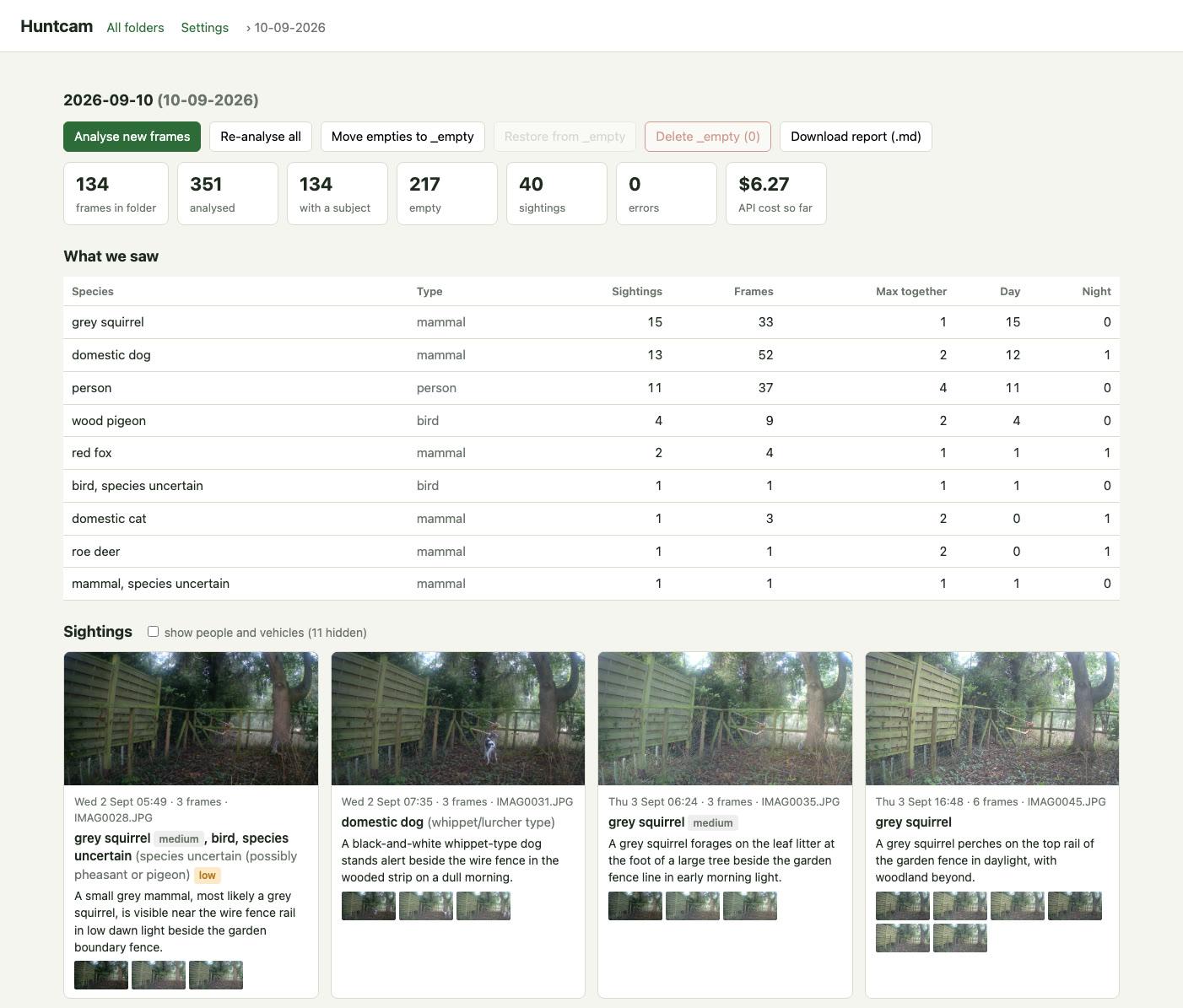
If you own a trail camera, clone it, put your Anthropic key in .env.local, and run npm run dev. It opens a page on localhost. You copy the pictures off the card to your computer, click Import, and about six minutes later you have a species table, a gallery of sightings with the best frame of each visit, and a markdown report. Empties move to an _empty folder so you can check them before deleting.
Cost with Claude Opus 5 is about two cents a frame, six dollars for a full card. Every answer is cached in a results.json next to the pictures, so re-running is free.
If you do not own a trail camera, the more useful part is what follows.
Simplest thing first
The stack is Node's built-in http module, one HTML file with vanilla JavaScript, and one dependency, the Anthropic SDK. Image resizing uses macOS's sips, which is already on the machine, with a fallback chain to ImageMagick and ffmpeg for other platforms. No framework, no build step, no bundler.
That choice paid for itself repeatedly. Every change was a file edit and a server restart. When we later needed a native folder picker so nobody has to type a path, it was one function that shells out to osascript on a Mac and a PowerShell dialog on Windows.
Two things the API taught us
Structured outputs are the right way to get JSON back from a vision call, but the schema validator is stricter than JSON Schema proper. Our first request failed with:
output_config.format.schema: For 'integer' type, property 'minimum' is not supported
The fix is to move the constraint into the field's description. Cheap to hit, and it cost nothing because a 400 is not billed.
The second one was silent. On the first full run, 53 of 351 frames came back with Connection error. and no result. The SDK's default of two retries is not enough for a 350-request batch. We raised it to six with a two-minute timeout, and made "Analyse" resend only the frames with no result, so a partial run is never wasted.
The species table problem
Asked for "the most specific identification you can justify", the model gave us 17 rows for one dog: "domestic dog (whippet/lurcher type)", "domestic dog (lurcher/whippet type)", "domestic dog, possibly a whippet". All correct, all useless for a count.
The fix was in the schema, not the prompt: a species field described as "plain common name only, lower case, no brackets or qualifiers", and a separate detail field for breed, colour and doubt. For results already on disk, a small normaliser strips brackets and ", possibly..." tails. The table went from 28 rows to 9 without re-analysing anything.
What the privacy pass found
Before publishing we scanned every file that would be committed for keys, email addresses, home paths and names. Clean. Then we looked at the screenshot and the promo video frame by frame, and found two things the grep could not see.
Trail cameras burn a strip into every frame: date, temperature, battery, and the camera's name label. Ours had been set to a place name. It was legible on every thumbnail in the screenshot and in the video.
The video also showed the app's Settings page, where the library folder field carried a full home-directory path.
Both were fixed at the source rather than by patching pixels. The app now crops the overlay strip off every card with two lines of CSS (aspect-ratio: 16/8.4; object-position: top), shows paths in ~ form, and has a "show people and vehicles" toggle so a wildlife-only view is one click. The video was re-recorded. The screenshot was regenerated with headless Chrome against the running app:
chrome --headless=new --window-size=1402,2600 --virtual-time-budget=30000 \
  --screenshot=shot.png 'http://localhost:4120/#10-09-2026?people=0'
A zoom animation in a screen recording moves the text you want to hide, so a blur box does not hold. Re-recording after fixing the UI is faster and certain.
Making it usable by someone else
The first version kept the pictures inside the project folder and expected you to name folders dd-mm-yyyy by hand. Fine for us, hopeless for a stranger. Three changes made it a real tool: a Settings page with a "picture library" folder chosen once, an Import page whose instructions are "copy the pictures to your computer, then Browse to them", and moving our own pictures out to that library so the repo folder holds only code.
The last one matters more than it looks. With the data outside the git working tree, there is nothing personal in the folder for a careless git add -f or git clean to touch. The gitignore still lists the patterns, but as a safety net rather than the only defence.
Takeaway
A grep is not a privacy review. Before you publish a repo with a screenshot or a video, extract a contact sheet from the video (ffmpeg -vf "fps=1/2,scale=480:-1,tile=5x10"), zoom into any overlay text and any form field, and fix what you find in the app rather than in the pixels. Then re-capture. It took an hour, and it is the hour that made the repo safe to share.
Enjoyed this? Get Hurricane Signal
Field notes on building real things with LLMs. Occasional, practical, no hype.
